Calculator
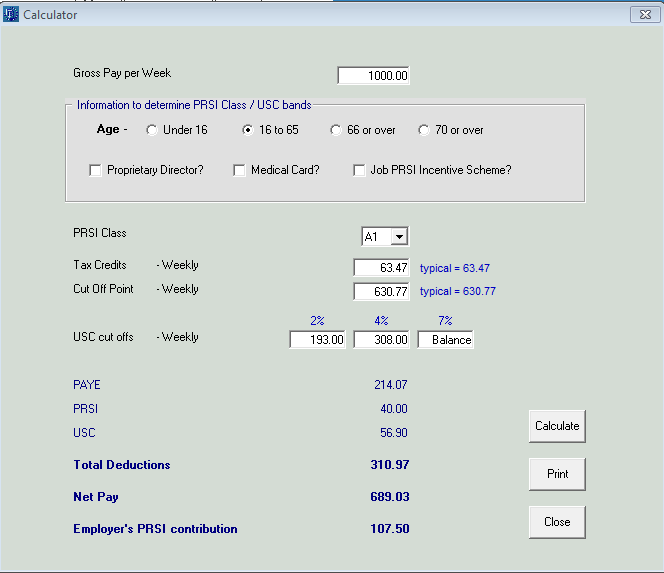
A built-in calculator allows employers to simply estimate (on a week one basis) the estimated deductions and employer cost of employing an employee at a certain Gross Pay.
This feature can be accessed from the Help menu
Help> Calculator>
Enter the proposed Gross Pay.
Select the age range of the employee to ascertain an appropriate PRSI class and USC rates (providing Revenue are informed of the same criteria for USC purposes) to apply:
- Under 16
- 16 to 65
- 66 or over
- 70 or over
Then simply select the category of employee:
- Proprietary Director
- Medical Card Holder
- Job PRSI Incentive Scheme
Based on this selection a PRSI class will be assigned.
Click Calculate
Thereafter the PAYE, USC, PRSI deductions will be calculated giving a guide to the Net Pay payable to the employee.
Additionally the Employer PRSI will be calculated to give the employer a guide to the additional employer payroll cost.
Need help? Support is available at 01 8352074 or thesauruspayrollsupport@brightsg.com.
Glossary of TermsPayroll DeductionsGetting startedImporting from previous yearCompanyEmployeesPensionsBenefit in kindProcessing PayrollIllness BenefitMaternity BenefitReverse UpdateHolidaysP45Backup and RestoreReportsCSOP30Year endNotifying ROS of new employeesFeature PayrollLegalLeave EntitlementsSEPA Bank Payment Files






